A SERP checker tells you where a website appears in Google for a given search, without you scrolling through pages of results yourself. SERP stands for search engine results page: the list Google shows after someone searches.
I run several UK sites, and checking rankings is part of my weekly routine. Search Console tells me roughly where a page sits on average. A SERP checker shows me the actual results page for one keyword, with every competitor in order. I use both, and this guide explains why.
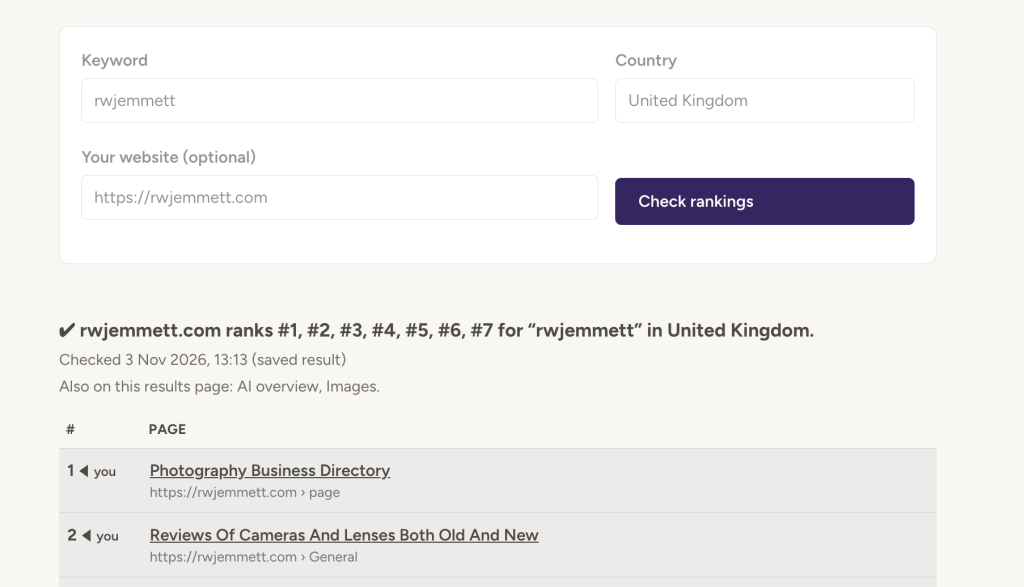
The SilverPoodle SERP Checker UK is free and needs no login. Type a keyword, pick the country, and it returns the ranked results for that market.
Using the SERP Checker UK, step by step
- Enter one keyword. Use the exact phrase a customer would type, such as “old photos of reading” rather than “reading”. Longer phrases tell you more, because you can actually compete for them.
- Set Country to United Kingdom. This decides which Google market the results come from. Results for the United States can look completely different.
- Click Search. The tool returns the ranked results for that keyword in that country.
- Find your site in the list. Note its position and the URL that ranks. If Google shows a different page from the one you expected, that tells you something too.
- Look at who sits above you. Open the top three results. Note what kind of page each one is (a guide, a tool, a product page, a forum thread) and how much it covers.
- Write it down. Keep a simple log of keyword, date, position and ranking URL. One check tells you little; a month of checks shows the trend.
Why your ranking looks different depending on where you check
There isn’t one single Google ranking. The same keyword can put your site in different positions depending on who searches and where. Google says this directly: your position in any one search can vary with factors such as your search history and location (Google Search Console Help).
| What changes | Why it matters |
|---|---|
| Country | UK and US results for the same phrase often share few sites. Always check the market your visitors are in. |
| Town or region | Searches with local intent, such as trades, shops or “near me”, reorder by place. Bracknell and Leeds can see different results. |
| Your own history | Searching in your usual browser can push sites you visit often higher. Checking your own site this way flatters it. |
| Device | Mobile and desktop results can differ, especially when maps, images or videos take up space. |
| Results page features | A map pack, “People also ask” box or video row can sit above result 1, so position 3 may still be below the fold. |
Search Console’s “average position” is not the same number
Search Console takes the highest position your site reached in each search, then averages it across every search where you appeared (Google). That makes it a blend of many people, places and devices over a date range.
A SERP checker gives one snapshot: one keyword, one country, one moment. Use Search Console to spot which keywords are worth watching. Use the SERP checker to see the actual page those keywords produce and who you’re up against.
What to do with the result
What you do next depends on where you landed.
| Your position | What it usually means | What to do |
|---|---|---|
| 1–3 | You’re winning this keyword. | Keep the page current and watch for new competitors. |
| 4–10 | Page 1, but most clicks go above you. | Improve the title and description so yours gets picked, then add what the top three cover and you don’t. |
| 11–20 | Page 2. Google rates the page, but not enough. | Usually the best place to spend effort. Expand the content, answer the questions people ask, and link to it from your other pages. |
| 21+ or not found | Google doesn’t see this page as a strong answer. | Check the right page is indexed, then ask whether it really matches what the searcher wants. |
A few SilverPoodle tools help with those fixes:
- Titles and descriptions: the meta tag tools in the SilverPoodle tools hub show what Google is likely to display.
- Images: Image Insight lists every image on a page with its format and alt text, so you can see what’s slowing the page or missing descriptions.
- Indexing: the XML Sitemap URL Extractor lists every URL in your sitemap, so you can check the page you want to rank is actually in it.
Questions people ask
Is the SERP checker free?
Yes. There’s no login and no account. Check one keyword at a time.
What’s the difference between a SERP checker and a rank tracker?
A SERP checker shows the results for a keyword right now. A rank tracker runs the same checks automatically every day and charts the changes. For a handful of keywords, a weekly manual check and a spreadsheet do the same job for free.
Why can’t I find my site in the results?
Either it ranks below the results the tool returns, or the page isn’t indexed. Run a site:yourdomain.co.uk search in Google, or check Search Console’s Page indexing report, to see whether Google has the page at all.
Why does my SERP position differ from Google Search Console?
Search Console averages your best position across all searches over a date range. The SERP checker shows one search in one country, now. Both are right; they measure different things.
How often should I check my rankings?
Weekly is enough for most small sites. Rankings move from day to day, so a single drop means little; a drop that lasts two or three weeks is worth looking into.
Can I check rankings for other countries?
Yes. Change the Country setting. That’s useful if you sell abroad, or to see how a UK competitor performs in the US.