When people first discover a website analysis tool, they’re usually trying to answer a simple question:
“What plugins is this website using?”
Whilst plugin detection can be useful, it rarely tells the whole story.
A modern WordPress website’s success depends on far more than the plugins it has installed. Performance, image optimisation, security configuration, content delivery networks, page speed, themes and overall website architecture all play an important role.
This is where SiteInsight takes a different approach.
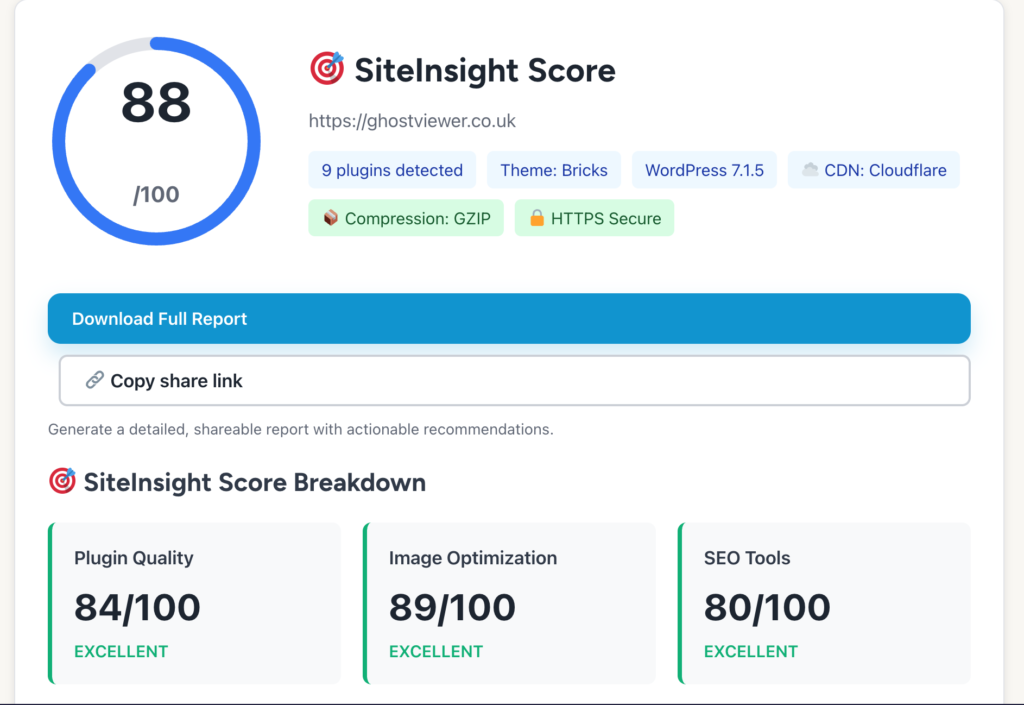
SiteInsight is a free WordPress website auditing and technology discovery tool that identifies themes, plugins and technologies, checks publicly visible security and image optimisation settings, runs PageSpeed analysis and generates practical recommendations to help improve your website.
What SiteInsight Does
Unlike traditional plugin detectors, SiteInsight analyses multiple aspects of a WordPress website in a single scan.
A typical scan includes:
- WordPress theme detection
- Plugin detection and categorisation
- Technology stack analysis
- Security visibility checks
- Image optimisation checks
- Google PageSpeed testing
- Website performance indicators
- CDN detection
- Optimisation recommendations
- Downloadable reports
The aim is not simply to identify what a website is using, but to show how well the site has been configured and where improvements can be made.
Looking Beyond Plugin Lists
Most website scanners stop after finding a theme and a few plugins.
SiteInsight continues much further.
Two websites might both use:
- Rank Math
- LiteSpeed Cache
- Fluent Forms
Yet one could be significantly faster, more secure and better optimised than the other.
The difference is often found in configuration rather than installation.
SiteInsight helps highlight these differences by examining publicly accessible optimisation and security indicators.
Technology Discovery Made Simple
Every WordPress website leaves clues about how it has been built.
SiteInsight identifies many of those clues and presents them in a clear and understandable format.
This includes:
- WordPress version
- Theme detection
- Plugin categories
- Content delivery networks
- Compression technologies
- Modern image formats
- Sitemaps
- Page speed indicators
The result is a useful snapshot of a website’s technology stack without requiring access to the website’s administration area.
New Security & Image Checks
One of the biggest improvements to SiteInsight is the introduction of the new Security & Image Checks system.
Rather than displaying a mysterious score with no explanation, SiteInsight now shows exactly what was checked, what passed and what needs attention.
Security checks currently include items such as:
- HTTPS configuration
- HTTP to HTTPS redirects
- Security headers
- Public WordPress version exposure
- User enumeration
- XML-RPC accessibility
- Firewall and CDN detection
Image checks include:
- WebP and AVIF support
- Lazy loading
- Image sizing
- Responsive images
- Large image detection
- Width and height attributes
Every result includes practical explanations written in plain English.
A Fairer Scoring System
One of the biggest problems with many website auditing tools is that they score websites based on assumptions.
SiteInsight takes a different approach.
Scores are based only on information that can genuinely be observed from outside the website.
For example, SiteInsight can verify:
- HTTPS
- Security headers
- Publicly exposed WordPress information
- CDN usage
- Image optimisation techniques
- Lazy loading
- Responsive image delivery
However, SiteInsight cannot reliably verify:
- Backup systems
- Security plugins
- Two-factor authentication
- Malware scanning
- Server-level security measures
Because these technologies cannot be confirmed externally, they do not reduce a website’s score.
This creates a more transparent and realistic assessment of a website’s public-facing configuration.
Actionable Recommendations
Finding issues is only half the job.
SiteInsight also explains how to fix them.
Recommendations are prioritised and written in plain English, helping website owners understand:
- What the issue is
- Why it matters
- How to improve it
Common recommendations might include:
- Adding missing security headers
- Enabling HSTS
- Restricting user enumeration
- Optimising large images
- Replacing oversized GIFs
- Improving image delivery
Rather than simply reporting problems, SiteInsight provides a practical action plan.
Downloadable Reports
Every scan can generate a downloadable report containing:
- Site scores
- Technology stack information
- Plugin summaries
- Security checks
- Image optimisation checks
- Recommendations
- Quick-win improvements
Reports can be shared with clients, colleagues or website owners and no email address is required to download them.
Faster Repeat Scans
SiteInsight now caches recent scan results, allowing repeat scans of the same website to return almost instantly.
This is particularly useful when:
- Reviewing client websites
- Comparing optimisation changes
- Running multiple audits
- Sharing reports with team members
The tool also keeps report downloads available after the initial scan, making it easier to revisit findings without running a completely new analysis immediately.
Who Is SiteInsight For?
SiteInsight is useful for:
- Website owners
- Freelance WordPress developers
- Web design agencies
- SEO consultants
- Digital marketers
- Bloggers
- Site managers
- Competitor researchers
Whether you’re auditing your own site or examining how another website has been built, SiteInsight provides valuable technical insights within minutes.
How SiteInsight Compares with Other Tools
| Feature | WPThemeDetector | ScanWP | BuiltWith | SiteInsight |
|---|---|---|---|---|
| Theme Detection | ✅ | ✅ | ✅ | ✅ |
| Plugin Detection | ✅ | ✅ | ✅ | ✅ |
| Security Checks | ❌ | ❌ | Limited | ✅ |
| Image Optimisation Checks | ❌ | ❌ | Limited | ✅ |
| PageSpeed Analysis | ❌ | ❌ | ❌ | ✅ |
| Actionable Recommendations | ❌ | ❌ | ❌ | ✅ |
| Downloadable Reports | Limited | Limited | Mainly Paid | ✅ |
| WordPress Focus | ✅ | ✅ | ❌ | ✅ |
| Plain-English Guidance | ❌ | ❌ | ❌ | ✅ |
Whilst many tools identify technologies, SiteInsight focuses on helping users understand and improve websites.
What Can and Can’t Be Scanned
SiteInsight analyses only information that is publicly accessible.
It cannot scan:
- Local development websites
- Private networks
- Password protected environments
- Hidden server configurations
The tool works from visible evidence and public responses, making the results realistic and transparent.
The Future of SiteInsight
The goal of SiteInsight is not simply to become another WordPress plugin detector.
The vision is to create a practical WordPress website auditing platform that helps website owners better understand the technologies, performance characteristics and optimisation opportunities behind successful websites.
As SiteInsight develops, reports, security analysis, image auditing and technology detection will continue to evolve, providing even greater insight whilst remaining easy to understand.
If you’ve ever wanted to know how a WordPress website is built, optimised and secured, SiteInsight provides a fast, practical and evidence-based way to find out.