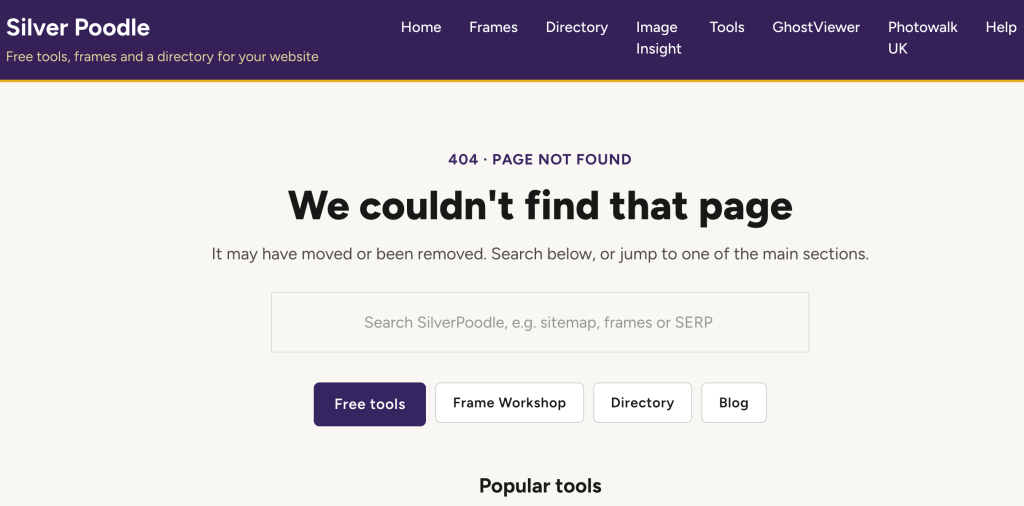
A broken link is a link to a page that no longer exists. Click it and you get a “404 Not Found” page instead of what you expected.
Every site collects them. When I checked SilverPoodle in Google Search Console this month, Google listed 17 URLs on it returning 404. A few were links to things I had deliberately removed, such as an old support forum. Others were feed URLs that plugins created and nobody ever links to. And one was a real loss: an article that had brought in most of the site’s search impressions, accidentally set to draft during the post tidy-up and not then published…. oops.
That mix is typical, and it’s the point of this guide. Most 404s don’t matter. A few matter a lot. The work is telling them apart, then fixing the ones that count in the right way.
Do broken links hurt your Google rankings?
Not directly. Google’s own answer is that URLs on your site returning 404 don’t affect how your other pages perform in search results (Google Search Central). Google stops indexing a page that returns 404 and gradually crawls it less often (Google Search Central).
They cost you in three other ways:
- Lost visitors. Someone who clicks a dead link in your menu or an article usually leaves.
- Lost links from other sites. If another site links to a page you deleted, the value of that link goes nowhere unless you redirect it.
- Wasted pages. A removed page that used to rank, like my old article, takes its search traffic with it.
What to avoid is a “soft 404”: a missing or empty page that returns “OK” instead of an error, so Google can’t tell it’s gone. Search Console reports these separately. A proper 404 is the right answer for a page that is gone on purpose.
How to find broken links
Use two checks: one for the links on your own pages, and one for what Google has found.
1. Check a page with the SilverPoodle Broken Link Checker
The free Broken Link Checker tests every link on one page.
- Enter the full address, including
https://, for examplehttps://yoursite.co.uk/. - Click Get Broken Links. The tool fetches the page and tests each link on it.
- Read the results table. Each row shows the link’s address, its link text and a status mark. A tick means the link works.
- Start with your busiest pages: the home page, your menu and footer (checked on any page), and your most visited articles.
When I ran it on the SilverPoodle home page, it listed every menu, footer and in-page link, including links out to GhostViewer and PhotoWalk UK, all with ticks.
[Screenshot: results table for the SilverPoodle home page]
2. Check Google Search Console
Search Console shows the URLs Google itself tried and found missing, including ones you’ve forgotten about.
- Open Indexing → Pages.
- Under “Why pages aren’t indexed”, click Not found (404).
- Work through the list of URLs. Use the “Last crawled” date to spot recent problems.
This catches what the checker can’t: old URLs that other sites still link to, and pages you removed months ago.
3. For big sites, crawl everything
If you have hundreds of pages, a desktop crawler such as Screaming Frog’s SEO Spider checks the whole site in one go. Its free version is limited in how many URLs it crawls.
How to fix them in WordPress
Each broken link needs one of three fixes. Which one depends on why the page is missing.
| Situation | Fix | Example from SilverPoodle |
|---|---|---|
| Your own link has a typo or points to an old address | Edit the link in the post, menu or widget | A menu item still pointing to an old page |
| The page moved, or a close replacement exists | 301 redirect from the old address to the new one | Tool pages moved from Support From Richard to SilverPoodle |
| The page was valuable and removed by mistake | Restore it | The affiliate programme article, now back |
| The page is gone on purpose, with nothing similar | Leave it as a 404 | The old support forum and plugin feed URLs |
Internal and external links need different fixes
- Internal links point to pages on your own site. You control both ends, so edit the link or redirect the old address.
- External links point to other people’s sites. You can’t redirect their pages, so fix the link at your end: find the page’s new address, link to an equivalent source, link to an archived copy on the Wayback Machine, or remove the link.
- Broken backlinks are other sites linking to a page of yours that’s gone. You can’t edit their link, so redirect the old address to the closest live page.
Adding a redirect with Rank Math
If you use Rank Math, its Redirections module does this without extra plugins.
- Go to Rank Math → Redirections → Add New.
- Enter the old address in Source URLs, for example
/old-page/. - Enter the new page in Destination URL.
- Choose 301 Permanent Move and save.
- Visit the old address to check it lands on the new page.
Rank Math’s 404 Monitor module, also under Rank Math, logs every 404 visitors hit. It’s a useful partner to Search Console.
Let Rank Math add redirects for you
The easiest broken links to prevent are the ones you create by renaming a post. Rank Math can add the redirect automatically.
- Go to Rank Math → General Settings → Redirections.
- Turn on Auto Post Redirect and save.
From then on, when you change a post’s URL, Rank Math adds a 301 from the old address to the new one and shows a notice saying so. That happened on SilverPoodle when I renamed a post, with no extra work.
Three mistakes to avoid
- Redirecting every 404 to the home page. Visitors land somewhere unrelated, and Google can treat these as soft 404s anyway.
- Redirect chains. If page A redirects to B and B to C, point A straight at C.
- Redirects that catch more than you meant. When I moved my tools, a broad redirect also caught the tools’ own search forms, so every search bounced back to the start. After adding redirects, test any forms on the affected pages.
Make your 404 page useful
Some visitors will always hit a missing page. A good 404 page turns that dead end into a way back in.
- Say plainly what happened, for example “Sorry, that page has moved or no longer exists.”
- Add a search box so visitors can look for what they wanted.
- Link to your main sections: home, your most popular pages or tools, and the blog.
- Keep the real 404 status. The page must still tell browsers and Google “not found”. A custom page that returns “OK” is a soft 404.
In Bricks, build it as a template with the Error Page type. It should still send the correct 404 status, but check it: open any made-up address on your site, for example /this-page-does-not-exist/, and run it through Search Console’s URL Inspection, or any HTTP status checker. It should show 404.
Designing a good 404 page
- Keep your normal header, menu and footer. Visitors should see at once that they’re still on your site.
- Use a short, friendly headline. “Page not found” works. A light touch that suits your site is fine, but the meaning must be clear.
- Give one main action. A search box is best on a content site. Otherwise a clear “Go to the homepage” button.
- Offer three to six useful links. Your most visited pages, main sections and newest posts. On SilverPoodle that means the Tools hub, Frame Workshop, the Directory and the latest guide.
- Offer a way to report it. A “Tell us about this broken link” link to your contact page brings problems you’d never find yourself.
- Keep it light. No pop-ups, and no countdown that sends people elsewhere automatically.
- Measure it. Rank Math’s 404 Monitor shows which missing addresses people actually hit, so you know which ones are worth a redirect.
Custom 404 page or redirect to the home page?
| Approach | Pros | Cons |
|---|---|---|
| Custom 404 page (recommended default) | Honest status for Google; visitor chooses where to go; 404s stay visible in reports so you can fix them | One extra click for the visitor |
| 301 to the closest matching page | Keeps the visitor and the value of any links pointing at the old address | Set up one by one; only right when a real replacement exists |
| 301 to the parent section, such as a deleted listing to its category | Relevant landing page; can be done by pattern | Only works where the section genuinely replaces the page |
| Redirect every 404 to the home page | No error page is ever shown | Confusing for visitors; Google can treat it as a soft 404; hides real problems from your reports |
| Countdown, then send to the home page | Looks helpful | Same problems as a blanket redirect, plus a delay that annoys people |
The rule I use: a custom 404 page by default, and a specific 301 only for pages that have a real replacement, get visits, or have links from other sites. Never send everything to the home page.
Questions people ask
Is the broken link checker free?
Yes, with no account or login. It checks one page at a time.
How often should I check for broken links?
Monthly suits most small sites, plus after any big change: a redesign, moving pages, or deleting old content.
Should I use a 404 or a 410 for a deleted page?
Either. Google treats them the same (Google Search Central).
What’s a broken backlink?
A link on someone else’s site that points to a page on yours that no longer exists. Search Console’s 404 list shows many of these. Redirect the old address to the closest live page so the link counts again.
Why does Search Console still list 404s I’ve fixed?
It only updates when Google recrawls those addresses, which can take weeks. Click Validate fix on the report to ask Google to recheck sooner.